It took me a number of years to finally pull the trigger on getting an Octatrack. I knew it had a reputation for being a bit overwhelming (I think there’s an interesting The Medium is the Message post on this someday). But, it seemed to check so many boxes for me: sampler, sequencer, effects, and most importantly (at the time) a live looper.
When I eventually got mine, though, I wasn’t so much overwhelmed as I was disappointed in the Pickup Machines. They really weren’t designed in a way that makes for quick and easy loop creation and overdubbing. I guess I should have gone for a dedicated looper pedal if I wanted that (yay for my Blooper!).
The problem for me was that there are a number of settings that need to be adjusted. Do you want the loop to be a set length or the length to be set by when you end your first pass? Do you want secondary loops to be a multiple of that length? Which inputs or internal tracks record to a particular machine? And so on. (Don’t get me started on gain staging and guitar-level signals). The settings aren’t complicated per se, but they are choices that slow down that first moment of “I just want to zone out and make some loops.”
But, over time, I found a setup that works for me and am now quite happy with looping on the Octatrack using Pickup Machines.
Here are my recording settings for the Pickup Machines:
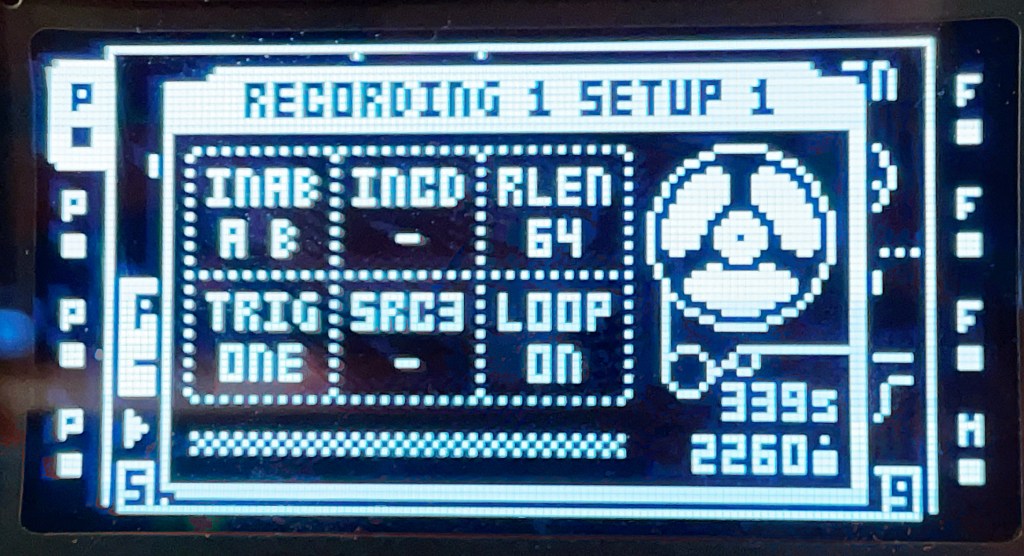
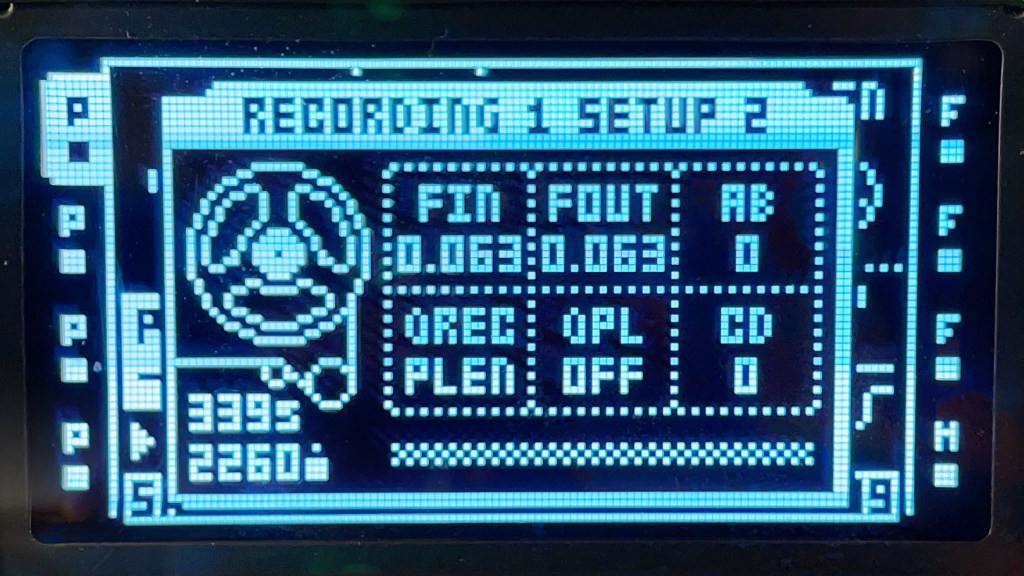
Track 1 – Pickup Machine with a quantized length of 64 steps (4-bars). Records from inputs A and B.
Track 2 – Pickup Machine with double the length of the master track (I still find this convention so weird). Also records from inputs A and B
Track 3 – Pickup Machine with a quantized length of 64 steps. Records from inputs C and D.
Track 4 – Pickup Machine with double the length of the master track. Also records from inputs C and D.
And now as I’m typing this, I realize that actually, I could probably set all 4 tracks to be double the length of the master. Because here is another weird thing: the first loop you record, regardless of the track number, is the master. So, if they are all set to record 64 steps (which they are) and all set to be double the length of the master (arg, why?) then after I do my first recording of 4-bars, I can just double (or x4 or x8) the rest of the tracks.
Ok, so moving on. Pickup Machines are the most fun when you have a foot pedal controlling their start/stop/record functions. This took me a couple years to appreciate (and finally purchase an appropriate pedal). I have a Morningstar MC6 Pro. It’s great, and probably overkill for my needs, but I use it with a bunch of other pedals too so it was worth the money.
Now, what goes into each input? Into A and B, I am running my Syntakt. I don’t use it every time I loop, but I like having it at the ready. Into C and D, I am running a stereo output from my Evo 16. This lets me send guitar, other synths, or my DAW into the Evo and out to the Octatrack. This is what I have been doing a lot of lately. And it’s nice because it is pretty good at getting a consistent level into the Octatrack.
All that said, what have I made with this setup lately? Nothing too exciting, but I have been having a lot of fun (that’s a theme around here: not great, but fun for me).
Here is part of a session with guitar and Syntakt looping:
And here is one with bass guitar running into my Chroma Console and then into the Octatrack:
And finally, here is my ADG 8-string touchstyle guitar running into the Chroma Console and then into the Octatrack:
Do you do this kind of looping with the Octatrack? If so, how do you have your setup configured?
